EphemerAI
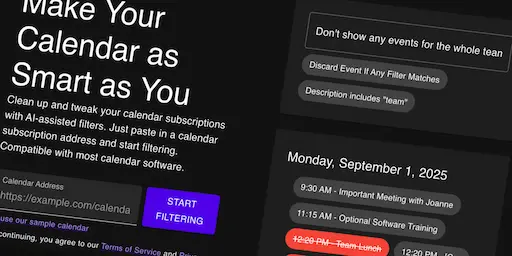
They say necessity is the bringer of invention, and that is certainly the case for this project. I have my digital calendar set up to pull all of my school assignments and due dates, which is great, except for when it isn't. Unfortunately the calendar export from my school's learning management system includes every single class I've ever been in, even the ones I've completed or dropped, leading to a bunch of unwanted calendar notifications. Being a computer science student, I couldn't tolerate this. Instead I had to spend weeks making a new piece of software, but hey it gave me a chance to mess with AI and finally learn React.
Features and Design
At the lowest level, EphemerAI functions as a filter system for calendar feeds, providing several predicates relevant to calendar events, and a number of boolean operations to combine them. I took care to ensure that the system could handle larger calendars, even those that exceed the edge isolate's memory, so I took a streaming-based approach to the parsing and filtering functions. It wasn't originally intended to use AI at all, but once I decided to turn it into a larger project, I realized users might struggle to design their own filters. It was a program built for a computer scientist, not the general public.
To remedy this, I built an AI-enabled web app on top of this filter system, teaching a LLM (Large Language Model) to write filters using my system, and then creating a user interface for the whole thing. One design consideration that was particularly important to me was to expose the results of the AI to the end user. That way users can look over and edit whatever filters the AI model comes up with. While AI is an extremely powerful tool, I believe that it remains important to be transparent about what is going on behind the scenes and give the user the option to override any autogenerated content if needed.
Process
Getting the AI model to reliably write filters was significantly more difficult than I thought. AI may seem like a drop-in solution for any computational problem, but it proved a challenge to get it to understand the filtering system I had built. I experimented with a variety of text-based system prompts before discovering the ability to enforce a JSON schema for the output. This forced the AI model to output in a format that matched my filtering system, allowing me to focus more on the design of the filters themselves. I eventually got the system prompt into a decent state, but there are still some cases where it just does not seem to understand the instructions given.
Once I was satisfied with the AI-assisted filter generation, I turned to creating the user interface, taking this project as an opportunity to properly learn React. I had dabbled into React and similar frameworks a few times before, but had yet to make a full web app with it. While the programming style takes some getting used to, I was pleasantly surprised that I was able to put my knowledge of functional programming to use with it.
Conclusion
Looking back at the design of this app, there are a few things I probably should have structured differently, especially in terms of integrating the frontend and backend. React and AI are both extremely powerful tools, but they take a lot of relearning and fine-tuning to use them correctly. This project was very much a learning experience and I hope to be able to apply what I have learned to future projects.